A freelance sales pipeline is the simplest way to stop running your business from memory. Instead of wondering which Upwork thread needs a reply or which proposal went cold, you see every commercial conversation on one board—with a clear next step for each.
This guide explains how to design a sales pipeline for freelancers that matches how solo operators actually sell: fast qualification, proposal-driven closes, and follow-up under delivery pressure. Whether you use a spreadsheet or a freelancer CRM, the stages and habits matter more than the tool.
Why freelancers need a pipeline (not just a to-do list)
To-do lists capture tasks. A pipeline captures deals in motion.
When you only track tasks, you optimize for busywork: "write proposal," "check email," "update portfolio." When you track pipeline stages, you optimize for revenue: "move this lead to proposal sent," "follow up on $4,200 deal waiting since Tuesday."
Without a freelance sales pipeline, these problems show up repeatedly:
- Leads sit in inboxes with no defined next action
- Proposals get sent but never tracked to outcome
- Follow-ups happen randomly—or not at all
- You cannot answer "how much business is in motion?" without guessing
A pipeline fixes visibility. Visibility fixes behavior.
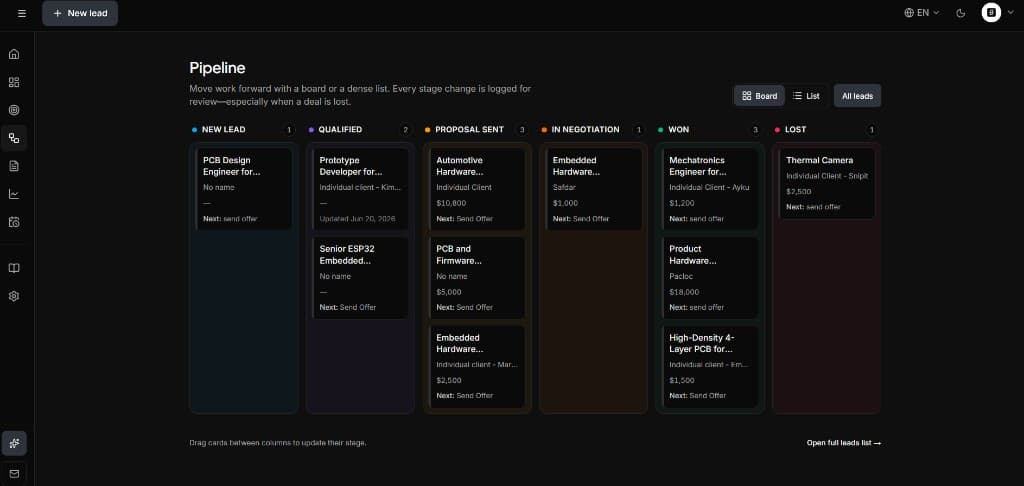
The five stages every freelance pipeline needs
You can add nuance later. Start with five stages that map to real decisions:
1. New
A lead entered your world: Upwork invite, inbound form, referral intro, LinkedIn DM. You have not qualified yet.
Exit criteria: You decided whether this is worth a conversation or a proposal.
2. Contacted / Qualified
You replied, asked clarifying questions, or had a short call. You understand scope, budget range, and timeline well enough to propose—or to decline politely.
Exit criteria: Go/no-go decision made.
3. Proposal sent
You delivered a proposal, quote, or scope document. The ball is partly in the client's court—but you own the follow-up plan.
Exit criteria: Client accepts, negotiates, or goes silent past your follow-up sequence.
4. Won
Contract signed, Upwork offer accepted, or deposit received. Hand off to delivery and optionally log expected revenue.
5. Lost
Deal did not close. Record why—price, timing, fit, ghosted—to improve future qualification.
Mapping channels to one pipeline
Freelancers sell through multiple channels. The pipeline must be channel-agnostic:
| Channel | What enters "New" | Notes | |---------|-------------------|-------| | Upwork | Job invite or submitted proposal | Track job URL and connects spent | | LinkedIn | Inbound message or outbound reply | Capture company and role | | Referrals | Email intro | Note referrer for thank-you loop | | Website | Contact form submission | Respond within 24 hours if possible | | Repeat clients | New project inquiry | Often skips straight to qualified |
The source field matters for later analysis— which channel produces wins—but the stages stay the same. That consistency is what makes a freelance lead management system work.
Daily and weekly pipeline habits
A pipeline only works if you touch it consistently.
Daily (10 minutes)
- Review anything in Proposal sent older than three days
- Move New leads to Contacted or archive within 48 hours
- Check follow-ups due today
Weekly (30 minutes)
- Count deals by stage: how much potential revenue is active?
- Review Lost deals from the week: pattern in price, scope, or speed?
- Identify one bottleneck (e.g., proposals stuck in draft) and fix the process
Tools like SoloPipeline surface this Monday view automatically—pipeline board plus dashboard KPIs—so you are not rebuilding the picture from email every week.
Metrics that matter for solo sellers
Enterprise teams track dozens of KPIs. Freelancers need four:
- Active pipeline value — sum of qualified deals with stated budgets
- Proposal send rate — leads that reach proposal sent ÷ qualified leads
- Win rate — won ÷ (won + lost) over rolling 90 days
- Average days to close — from New to Won
Do not optimize vanity metrics like total leads captured. Ten qualified leads beat fifty unread Upwork notifications.
Where proposals and follow-ups fit
The pipeline is the backbone. Two modules connect most directly to revenue:
Proposals
Proposal work should move the deal forward, not pause it in a blank Google Doc for a week. Tie each proposal to a lead record so "Proposal sent" is one click—not a memory exercise.
Our guide to writing freelance proposals covers structure and templates. The pipeline tells you when to send; the proposal content tells you what to send.
Follow-ups
Most lost freelance deals die in silence after the proposal—not on price. Build a default follow-up sequence when a deal enters Proposal sent:
- Day 2: short check-in
- Day 5: add value (relevant example or clarification)
- Day 10: direct ask on decision timeline
Details and copy in our follow-up guide.
Common pipeline mistakes
Too many stages. "Discovery scheduled" and "Discovery completed" can be one stage until you have enough volume to split.
Stages that describe your work, not the sale. "Designing mockups" belongs in project management, not sales—unless the mockup is the proposal vehicle.
No lost reason. Without loss tags, you cannot fix qualification.
Pipeline outside the CRM. If stages live in your head and details live in Upwork, you will double-enter or drop leads.
Building your first pipeline this week
Here is a practical rollout:
Day 1: Define your five stages on paper. Write one sentence per stage for exit criteria.
Day 2: Enter every active commercial conversation. Be honest about stage—even if most are messy.
Day 3: Send one stalled proposal or follow up on one Proposal sent deal.
Day 4: Add budget and source fields to every lead.
Day 5: Review counts by stage. Identify the biggest leak (usually follow-up or slow proposals).
If you want software from day one, use a freelancer CRM with a built-in kanban rather than customizing Airtable for hours. SoloPipeline ships with stages aligned to this model.
Upwork-specific pipeline notes
Upwork adds constraints: connects, proposal limits, and in-platform messaging. Treat each application as a lead entering New or Proposal sent depending on whether you have already submitted.
Track:
- Job title and posted budget
- Connects spent (cost of acquisition)
- Date of last client view (when visible)
- Follow-up permission (some jobs allow messages after proposal)
Our dedicated Upwork proposal tracker workflow walks through this channel in detail.
Choosing the best CRM for your pipeline
Once the stages feel right, pick tooling that reduces friction:
- Kanban or list view by stage
- Lead detail with source, budget, notes
- Proposal linked to lead
- Follow-up dates on the deal record
Compare options in our best CRM for freelancers guide.
Summary
A freelance sales pipeline turns scattered conversations into a repeatable system:
- Five stages: New → Contacted → Proposal sent → Won / Lost
- Daily follow-up discipline on Proposal sent
- Four metrics: active value, send rate, win rate, days to close
- One tool—or consistent spreadsheet—so the board stays true
You do not need enterprise sales ops. You need clarity on what is moving, what is stuck, and what to do next.