Choosing the best CRM for freelancers is not the same as choosing CRM software for a sales team of fifty. You do not need territory management, complex forecasting, or a six-week onboarding program. You need a system that helps you capture leads, move proposals forward, and follow up when delivery work gets busy.
This guide compares realistic options for solo operators in 2026: spreadsheets, general-purpose tools, enterprise CRMs, and lightweight CRM platforms built for freelancers. By the end, you will know what to prioritize and how to pick a setup that supports your commercial work without becoming another job.
What freelancers actually need from a CRM
Before comparing products, define the job. For most service freelancers—developers, designers, marketers, consultants, copywriters—the commercial loop looks like this:
- A lead arrives (Upwork, LinkedIn, referral, inbound form)
- You qualify quickly and decide whether to propose
- You draft and send a proposal
- You follow up until the deal closes or dies
- You deliver the project and optionally nurture for repeat work
A freelancer CRM should make those five steps visible. If it only stores contacts but does not help you track proposal status or next follow-up dates, it is a contact list—not a sales system.
Here is a practical requirements checklist:
- Lead capture from multiple channels — Upwork, email, DMs, referrals
- Pipeline stages — so you know what is waiting on you vs. the client
- Proposal tracking — which version went out, when, and to whom
- Follow-up reminders — the step most freelancers skip under deadline pressure
- Low setup overhead — you should be organized within an hour, not a quarter
Option 1: Spreadsheets and Notion
Many freelancers start with Google Sheets, Airtable, or a Notion database. This works until volume and context become painful.
Pros:
- Free or very cheap
- Fully customizable columns and views
- Familiar interface
Cons:
- No native follow-up scheduling tied to deal stage
- Proposal content lives elsewhere (Docs, email, Upwork)
- Easy to let rows go stale when you are heads-down on client work
- Reporting requires manual formulas
Spreadsheets are fine for five active leads. They break down when you are sending multiple proposals per week across Upwork, LinkedIn, and referrals—and you cannot remember which thread needs a nudge today.
Option 2: Enterprise CRM (HubSpot, Salesforce, Pipedrive)
Enterprise and mid-market CRMs are powerful. They are also optimized for teams with SDRs, account executives, and marketing ops—not for a solo operator drafting Upwork proposals at midnight.
Pros:
- Mature reporting and integrations
- Strong email automation at scale
- Recognized by larger clients in B2B contexts
Cons:
- Feature bloat: modules you will never open
- Per-seat pricing that assumes a team
- Setup friction: pipelines, properties, workflows
- Mental overhead: the tool becomes a part-time job
If you sell retained consulting to mid-size companies and need marketing automation, a general CRM can make sense. If your work is project-based and proposal-driven, you will spend more time configuring the CRM than closing deals.
Option 3: Lightweight CRM for freelancers
The best CRM for freelancers in 2026 is usually a focused product that maps to the lead → proposal → follow-up loop—not a shrunken enterprise suite.
Look for tools that:
- Default to a simple pipeline (new, contacted, proposal sent, won, lost)
- Connect proposals to leads without copy-pasting across apps
- Surface "what needs attention today" on one screen
- Stay affordable at single-user scale
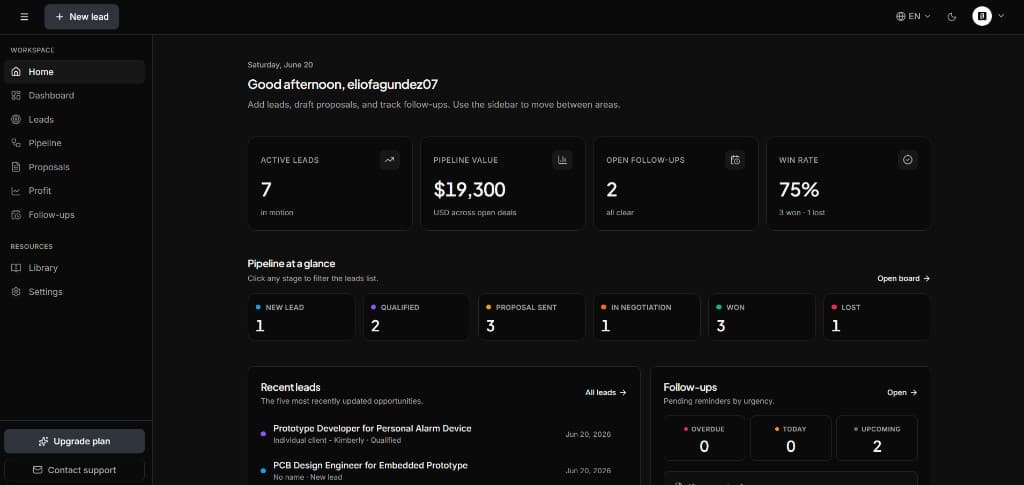
SoloPipeline is built around this model: capture leads from Upwork and other channels, draft proposals with AI assistance, and track follow-ups in one workspace—without HubSpot-level complexity.
Comparison table: freelancer CRM options
| Criteria | Spreadsheet | Enterprise CRM | Freelancer CRM (e.g. SoloPipeline) | |----------|-------------|----------------|-------------------------------------| | Setup time | Low | High | Low | | Built for solo operators | Manual | No | Yes | | Proposal tracking | Weak | Moderate | Strong | | Follow-up reminders | Manual | Strong (if configured) | Built-in | | Monthly cost (solo) | $0–15 | $30–100+ | Free tier available | | Risk of abandonment | High | High | Lower |
How to evaluate a freelancer CRM in 30 minutes
Do not read every feature page. Run this short evaluation:
1. Add three real leads
Use actual Upwork jobs or recent inquiries—not demo data. If entering a lead feels slow, you will stop using the tool within two weeks.
2. Move one lead to "proposal sent"
Check whether the CRM links the proposal to the lead automatically or forces you to hunt across folders and tabs.
3. Schedule a follow-up
The best CRM for freelancers makes the next touchpoint obvious. If follow-ups live in a separate calendar with no tie to deal stage, deals will slip.
4. Open the app on Monday morning
You should immediately see what is stuck, what is waiting on the client, and what you need to draft today. That Monday view is the whole point.
Common mistakes when choosing a CRM
Buying for the business you want in three years. Choose for the next ninety days of sales activity. You can migrate later if team size changes.
Optimizing for reporting instead of action. Win rate charts are useless if proposals sit unsent because the tool is too heavy.
Treating the CRM as storage. A CRM is a workflow system. If it does not change what you do on Tuesday morning, it is shelfware.
Ignoring follow-up. Most freelancers lose deals on follow-up discipline, not proposal quality. Prioritize reminders and stage-based next actions. See our follow-up guide for templates.
When to upgrade from spreadsheets
Upgrade when you notice these signals:
- You have more than ten active commercial conversations
- You have sent a proposal in the last seven days and are unsure who to nudge
- You are copying proposal blocks manually every time
- You found an old Upwork thread and realized you never replied
That is the moment a freelance proposal CRM pays for itself—not when you read a "scale your agency" blog post.
How SoloPipeline fits the freelancer CRM job
SoloPipeline focuses on the commercial loop freelancers actually run:
- Leads — capture source, budget, and context from any channel
- Pipeline — kanban stages with clear next actions
- Proposals — AI-assisted drafting tied to the lead record
- Follow-ups — scheduled reminders so nothing goes quiet
- Library — reusable commercial content instead of rewriting from scratch
It deliberately avoids enterprise modules: no territory rules, no marketing hub, no implementation partner network. That is the point.
If you are comparing options, read our freelance sales pipeline guide to see how stages should map to your workflow, and our Upwork proposal tracker workflow if Upwork is a primary channel.
Final recommendation
The best CRM for freelancers in 2026 is the one you will open every Monday—not the one with the longest feature list.
For most solo operators selling services online:
- Start simple — spreadsheet or lightweight CRM
- Prioritize proposal + follow-up tracking over advanced reporting
- Switch before chaos — migrate when you feel friction, not after you lose a deal
If you want a purpose-built lightweight CRM that connects leads, proposals, and follow-ups without enterprise bloat, SoloPipeline is designed exactly for that job.