Most freelance deals are lost in the silence after the proposal—not because your price was wrong or your portfolio weak. Clients get busy. Committees slow down. Other proposals blur together. A professional freelance proposal follow up sequence brings you back to the top of their mind without sounding desperate or pushy.
This guide covers when to follow up, how many touches to send, copy-ready templates for email and Upwork, and how to build follow-up discipline into your freelance sales pipeline so nothing slips when delivery work intensifies.
Why follow-up matters more than another portfolio tweak
Improving follow-up discipline often raises win rate faster than redesigning your website. Consider what happens after you send:
- The client intended to reply "tomorrow" and did not
- Your proposal is one of five; they shortlist three and forget the rest
- An internal stakeholder blocked progress without telling you
- Your email landed during a launch week
None of these mean "no." They mean no decision yet. A concise follow-up creates a decision moment—yes, no, or not now.
The default follow-up timeline
Use this sequence for most project-based proposals (email or Upwork where messaging is allowed):
| Day | Action | Goal | |-----|--------|------| | 0 | Send proposal | Establish scope and price | | 2 | Touch 1 — confirm receipt | Open conversation | | 5 | Touch 2 — add value | Demonstrate continued interest + expertise | | 10 | Touch 3 — direct ask | Learn decision status and timeline | | 17 | Touch 4 — breakup (optional) | Close the loop professionally |
Adjust for urgency: rush jobs may need Day 1 and Day 3 spacing. Enterprise clients with procurement may stretch to Day 7 and Day 21.
Stop after Touch 4 unless the client re-engages. Persistence without spacing becomes noise.
Follow-up templates that work
Touch 1 — Day 2 (confirm receipt)
Subject: Re: [Project name] proposal

Hi [Name],

Wanted to confirm you received the proposal I sent on [day] and check whether
any questions came up as you reviewed it.

Happy to clarify scope, timeline, or pricing in a quick reply.

Best,
[Your name]
Short. No guilt. No "just circling back" filler.
Touch 2 — Day 5 (add value)
Subject: Re: [Project name] — quick note on [specific topic]

Hi [Name],

One thing I did not emphasize in the proposal: [one relevant insight, mini case
point, or risk you will mitigate].

If useful, I can walk through how this applied on a similar [project type]
in a 15-minute call this week.

Best,
[Your name]
This touch must contain new information—not "bumping this to the top of your inbox."
Touch 3 — Day 10 (direct ask)
Subject: Re: [Project name] — timeline check

Hi [Name],

Do you have a sense of timeline for moving forward on [project]? I am holding
capacity for [month/week] and want to align with your plans.

If priorities shifted, no problem—just let me know and I will close this out
on my side.

Best,
[Your name]
Direct asks respect both parties' time.
Touch 4 — Day 17 (professional close)
Subject: Re: [Project name] — closing the loop

Hi [Name],

I have not heard back so I will assume the timing or fit is not right for now.
I am closing this thread on my end—feel free to reach out if things change.

Wishing you a smooth [launch/quarter/project].

Best,
[Your name]
Breakup emails often produce the fastest replies. Use them genuinely—not as a manipulation trick.
Upwork-specific follow-up notes
Platform rules vary by job and account type. Within what Upwork allows:
- Respond instantly to client messages and interview invites
- Use permitted post-proposal messaging when available—keep Touch 1 length
- Do not paste email templates that ignore job context
Integrate Upwork jobs into your Upwork proposal tracker workflow so platform deals get the same follow-up discipline as email leads.
Tone rules: helpful, not pushy
Do:
- Reference their project specifically
- Offer clarification or a short call
- Accept "not now" gracefully
- Space messages days apart
Do not:
- Send multiple messages in 24 hours
- Use fake urgency ("offer expires tonight" unless true)
- Question their professionalism ("I guess you are not serious")
- Copy passive-aggressive LinkedIn hustle culture
Clients hire freelancers who feel safe to work with. Follow-up tone is part of that evaluation.
Where follow-ups live in your workflow
Follow-ups fail when they depend on memory. Tie each reminder to a deal in Proposal sent:
- Send proposal
- Move pipeline stage to Proposal sent
- Schedule Touch 1 (+2 days), Touch 2 (+5 days), etc.
- Log client replies on the lead record
- Mark Won or Lost when resolved
Your freelance sales pipeline should make overdue follow-ups visible every morning.
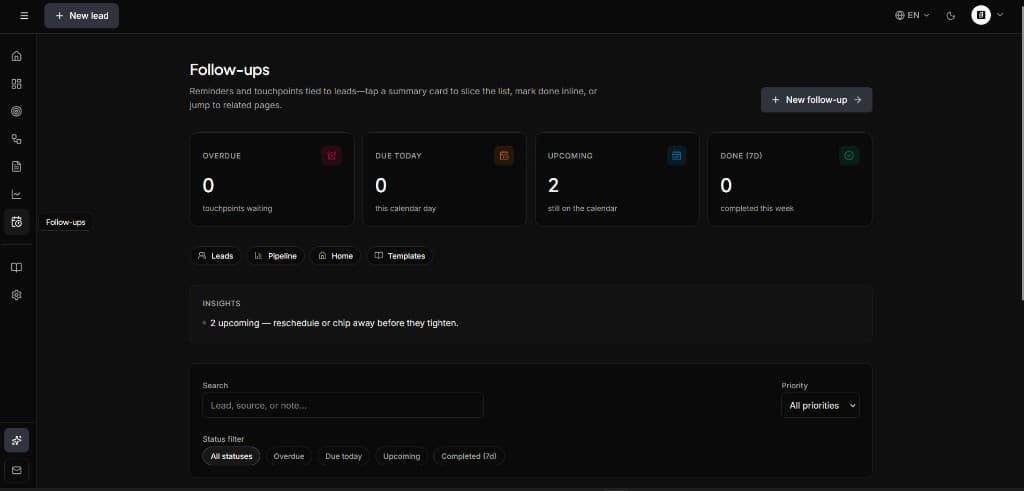
SoloPipeline includes follow-up scheduling on the lead record so reminders surface in your workspace—not buried in a calendar event you ignore.
Handling common client responses
"Still reviewing." Reply: "Understood—any missing info I can provide? Happy to jump on a 15-minute call."
"Too expensive." Reply with scope adjustment or phased option—not immediate discount. See pricing patterns in our proposal guide.
"We went with someone else." Reply: "Thanks for letting me know—if you do not mind sharing what tipped the decision, I would appreciate the feedback."
Ghosting after Touch 3. Send Touch 4 and mark Lost — ghosted. Move on.
Follow-up mistakes freelancers make
Following up on bad fits. Qualification saves everyone's time. Review our CRM guide for qualification habits.
Identical copy every time. Templates are starting points—personalize one line minimum.
No tracking. If you do not know which deals are due today, you will batch-follow-up frantically every three weeks.
Apologizing for following up. "Sorry to bother you" undermines confidence. You are helping a decision happen.
Stopping after one attempt. Touch 1 alone rarely moves enterprise or busy founder deals.
Building a weekly follow-up habit
Block 15 minutes every weekday morning:
- Open pipeline filtered to Proposal sent
- Send all touches due today
- Update stages for any replies overnight
- Reschedule next touch if client asked for more time
Friday add: count proposals sent vs. followed up. Aim for 100% of due touches completed.
Tools vs. calendar reminders
Calendar alerts work for one deal. They break at scale. Use:
- CRM follow-up dates on the lead
- Pipeline view sorted by next action
- Optional email integration later—manual is fine at solo volume
A freelance proposal CRM connects follow-ups to deal context so you remember what you proposed when the reminder fires.
Summary
How to follow up on freelance proposals without being pushy:
- Use a four-touch sequence: Day 2, 5, 10, optional 17
- Keep messages short, specific, and value-add on Touch 2
- Ask directly about timeline on Touch 3
- Close professionally on Touch 4 if needed
- Tie reminders to Proposal sent deals in your pipeline
- Review follow-ups every weekday morning
Follow-up is the lowest-cost improvement in most freelance sales systems. Send the proposal once; earn the deal with calm, consistent communication.